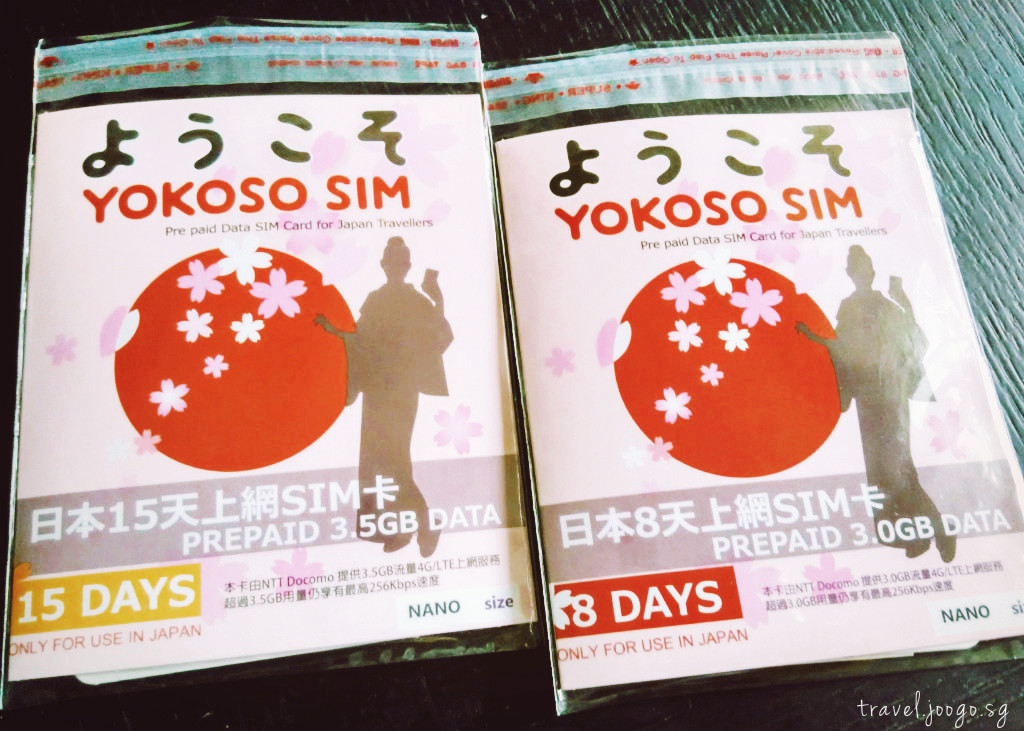
My husband and I decided to each get a Yokoso SIM Card to travel around Hokkaido and Tokyo. My husband got the 15-day SIM card for the whole Japan trip, while I got a 8-day card for our 8.5 days stay in Hokkaido. And for the rest of the trip in Tokyo, I tried out the pocket WiFi provided by our Tokyo airbnb host.
One major reason we chose SIM card over WiFi was the price. Since we only have two people with two devices in total, it was more value for money to get two SIM cards (or one SIM card and tether) than one pocket WiFi. Pocket WiFi is preferably for travel group with many devices to be connected. Then again, there might be group buy discount for the SIM cards (read on). Do your sums. ;)
If you are unsure of whether to use a pocket WiFi or SIM card, read a detailed comparison in my previous post.

Which SIM card to buy?
There are quite a number of Japan SIM card providers. Most of Japan’s “tourist” SIM cards do not have voice call function, but only data. But you can connect Whatsapp/Skype calls with the data. Here’s a quick summary:
SIM cards with fixed data limit per day
This usually comes with fixed days such as 8 or 15 days. If your travel duration coincides with the SIM card length of use then this would be a good option. A few options:
SIM cards with fixed data limit for a period of time
If you want to get a SIM card but wants flexibility in the days of use, you might want to consider these options:
Note that the list of providers above is not comprehensive nor my recommendations, but for your information only.
Just to add, a reader emailed me a good question, “If there is an earthquake, will I have difficulty in using my mobile with only data sim & no voice call function?”
I was reminded of the history of “Line” app. From Wikipedia, “Line began as a response to disaster. Japan’s devastating Tōhoku earthquake in March 2011 damaged telecommunications infrastructure nationwide, obliging employees at NHN Japan, a unit of Korea’s NHN Corp, to rely on Internet-based resources to communicate.”
So sometimes, data might work better than voice during earthquakes.
Purchase of Yokoso SIM Card
Where to purchase Yokoso SIM Card?
While we were still contemplating about the pocket WiFi rental, we saw the flyer of Yokoso SIM Card at JTB Singapore. Then, we compared the price to Yokoso’s SG online shop.
8 Day SIM:
- JTB is selling at S$38.
- Yokoso online shop is selling at S$40 with S$3 delivery. But there are more plans for you to choose from than at JTB.
JTB is cheaper but not good for people who will be in Japan for more than 8 days. We searched further and found Yokoso SIM Card on Qoo10. It’s even cheaper than JTB! And there is a variety of plans too.
The Qoo10 shop, www.qoo10.sg/shop/yokososim, is selling at the following prices + S$1 normal delivery:
- 8 days (3GB) SIM at S$35
- 15 days (3.5GB) SIM at S$39
- 31 days (4GB) SIM at S$46
- 91 days (5GB) SIM at S$57
We were excited to find such a good deal for 15 days! The reviews were quite good, so it’s likely to be a legitimate Qoo10 seller. Did further due diligence and the Qoo10 seller, Shinji Matsudaira, turns out to be the authorised retailer for Yokoso SIM cards in Singapore. He is listed on Yokoso SIM website with the following details: [email protected], +65 9850 7722.
But time was running out, we were leaving in 4 days’ time and not sure if the delivery would come on time. Thankfully, Mr Shinji Matsudaira was flexible, and we were able to self-collect it at City Square Mall, a convenient place for us.
Btw, I did read somewhere in the Qoo10 Q&A section, he might offer you discounts for group buy, you can check with him first. You never know!

Why Yokoso SIM Card? Why not other SIM card providers?
Initially, we didn’t consider using a SIM card but a pocket WiFi. It was until a few days before we leave for Japan that we decided a SIM card might be more value for money. There was not much time for us to research and weigh the various SIM card options.
Since Yokoso SIM card is promoted by JTB, it can’t be that bad.
Unlike most other SIM cards, we could obtain Yokoso SIM while in Singapore. This will allow us to have internet connection immediately upon landing. Moreover, getting SIM card in Singapore means saving the hassle to arrange for pick up, or worry about lost mail/late delivery at the airport or hotel.
Also there’s no need to return the SIM card after usage.
The best part is, you can save further if you decide to just tether and share the internet connection via hotspot! Though tethering might drain your mobile battery faster, and you might hit the daily data limit sooner.
(p.s. We didn’t try the tethering, but it was stated on the Qoo10 shop that it’s possible to tether.)
Mobile Compatibility?
We found the Yokoso good deal but based on the online reviews, and later we saw on the packaging, this card doesn’t work with Xiaomi phones! We were both using Xiaomi HM NOTE 1LTE.
FYI, it’s also written on the packaging that dual sim card, unbranded or/and sim locked phones cannot be used for this SIM card.
But we decided to take the risk, since the reviews about SIM not working were mostly on Xiaomi’s first generation phones. In addition, the seller agreed to give us a complimentary 8-day SIM card with purchase of a 15-day card for a mention in this website. So, even if the SIM cards fail on our Xiaomi phones, our loss is not too heavy.
Verdict: Yokoso SIM works for certain Xiaomi Models
- The Yokoso SIM works for us! So for those using Xiaomi HM NOTE 1LTE (Android Version: 4.4.4 KTU84P) like us, you can safely purchase Yokoso SIM.
- I should think that Xiaomi’s newer models will also work with Yokoso SIM. (Update from a reader: Yokoso SIM is fully compatible with Xiaomi Redmi Note 3 Pro (Snapdragon) and Xiaomi Redmi Note 3 (MTK).)
- However, Yokoso SIM can’t work on certain Xiaomi phones, mainly the first generation 3G phones, so it all depends on your HP model.
For other phone models such as iPhone, you can check out the comprehensive list of supported models at: www.yokososim.com/Sjxh.aspx?id=263
Data Usage and Speed?
The data available to you depends on the plan you are getting. For example, 3GB is available for an 8-Day SIM while 4GB is available for a 31-Day. For the latter, the speed will slow down to 200kbps once your usage reaches 4GB. The speed will also slow down when you hit the daily limit of 500MB.

Our experience with Yokoso SIM Card and Pocket wiFi in Japan
Yokoso SIM card
We changed our SIM cards and APN setting while on our flight to Japan and we were connected to the internet once we landed! Yays!
Important about APN* setting:
- Android Phones: In our experience, no internet connection was required to activate the SIM. Our APN settings disappeared after we switched our SIM to Yokoso SIM. Thus, set up the APN profile after you change your current SIM to Yokoso SIM. In any case, instructions to set up the APN profile is printed on the packaging.
- iPhone (Apple iOS8 and above models): You need to have the internet connection for installation of APN. You can download the .mobileconfig file from http://jpmob.jp/i or http://jpmob.jp/i2. These links are provided by www.yokososim.com (scroll till the end of the page to “Matters needing attention”).
(*Access Point Name (APN) is the name for the settings your phone reads to set up a connection between the carrier’s cellular network and the public Internet.)
The connectivity was good in general. We travelled in Tokyo, Sapporo, Otaru, Tomamu, Noboribetsu and Niseko. The connection was lost only in certain short parts of our train journey, especially when we went through the mountain tunnels. Otherwise we were pleased with the connectivity! :)
Pocket WiFi
I had a really bad experience with the pocket WiFi provided by our Tokyo airbnb host (after using the Yokoso SIM card in Hokkaido). I forgot to take a photo of the pocket WiFi, because I hardly use it. Probably only 20% of my whole time in Japan.
- The pocket WiFi runs out of battery really fast (it was probably overused by the other airbnb guests). So I had to turn off and on each time I want to use. In the end, I simply reduced my internet usage to save me the trouble.
- I was contemplating whether to use my husband’s portable battery to charge the pocket WiFi, but it makes my handbag really heavy. Mobile + pocket WiFi + portable battery + my miscellaneous stuff.
In the end, I decided it’s easier to use my husband’s mobile with Yokoso SIM card for directions and information.
(Updated 11 Sep 2016)
Have you used a data SIM card or pocket WiFi in Japan before? Or a Yokoso SIM card in Japan? Share with us your experience below or on our Facebook Page or Instagram. Bookmark this page >> Overview: Japan Itinerary 2016